Impact
- Automated project documentation process using AI agents
- Created structured knowledge base consumable by any service
- Eliminated manual content management workflows
- Self-documenting system: this very entry was created using the system itself
Overview
This project presents an automated portfolio management system that combines AI-powered documentation with structured knowledge repositories. The system enables automatic creation and maintenance of project entries on a personal website through the use of MCP (Model Context Protocol) servers, AI agents, and standardized markdown templates.
The solution addresses the common challenge of maintaining an up-to-date portfolio by creating a workflow where project documentation is automatically consumed from a GitHub repository and rendered dynamically on a website. The system features intelligent content creation through AI agents that can generate new project entries following predefined templates and organizational standards.
My Contribution
I designed and implemented the entire automated system from conception to deployment. This included:
- Architecture Design: Created a structured repository system with clear documentation standards
- MCP Server Development: Built custom MCP tools using n8n workflows that connect to GitHub APIs
- AI Integration: Developed context files and templates that guide AI agents in creating project entries
- Website Integration: Implemented automatic content consumption from markdown files to dynamic web pages
Process
For months, I had been thinking about organizing my projects in a common place—a site where anyone could enter and see photos, videos, check the repository, and get all the details. In 2020, I created a Facebook page, but its reach wasn't what I expected, and I couldn't reach the audience I wanted. Then I naturally started sharing everything on LinkedIn, where people could see it, interact with the content, and check it whenever they wanted. But it didn't look so organized, so I knew it: I had to create a website, first as an engineering exercise and mainly to organize my portfolio.
I first tried with a WordPress server and had an acceptable first iteration, but when I started uploading content, it felt very manual, and I couldn't find a way to automate it.
Later, learning more about MCP servers, agents, and context, I learned about how software development processes should be documented with AI development in mind. Applying this new knowledge, I wanted to bring this to my website—it was exactly what I needed: a knowledge base that any service could consume.
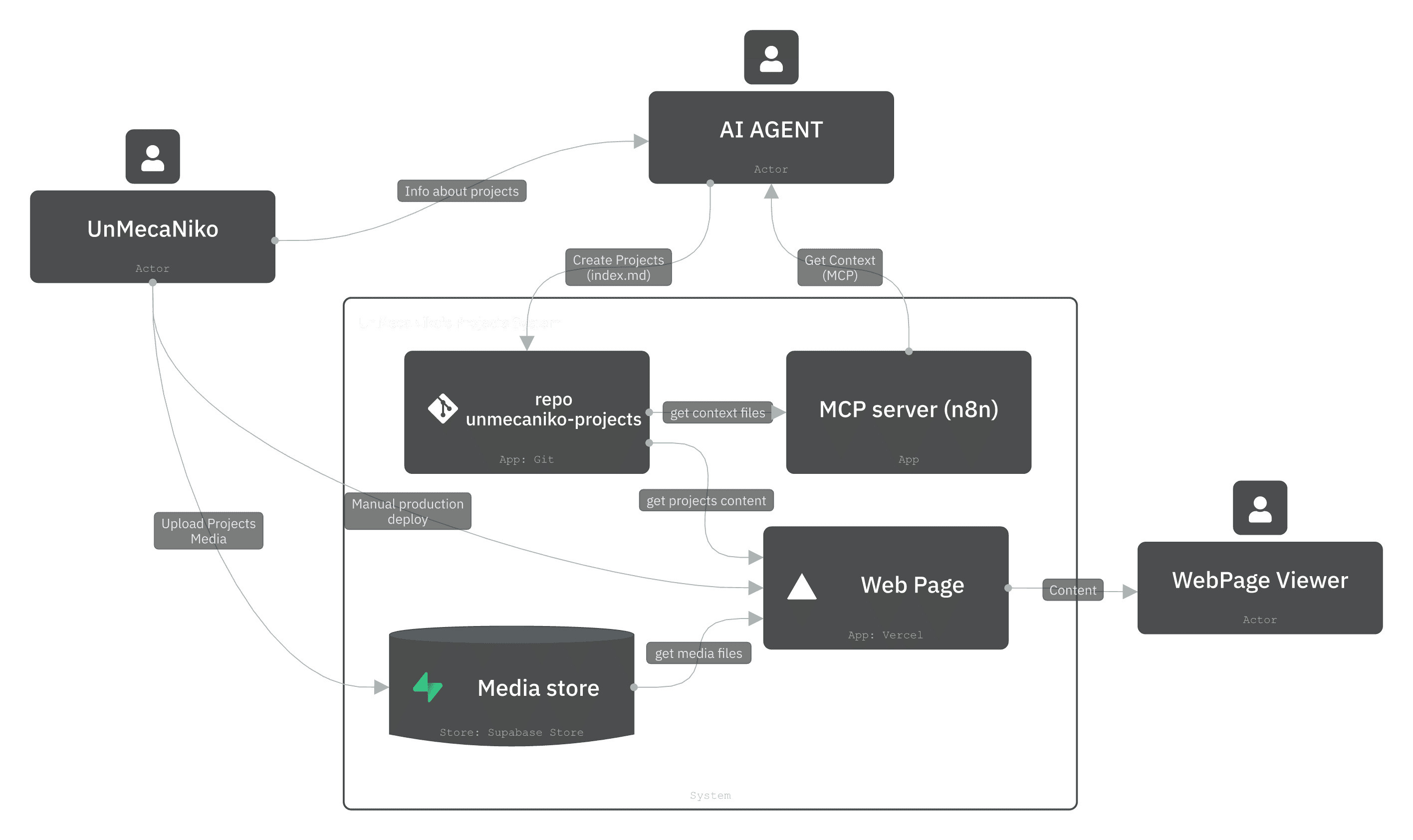
I created a repository with a clear structure where all my project information is stored and created a special context folder that explains how this repository is organized and gives instructions to agents so they can create new entries. In fact, this post was created from a Copilot prompt that connects to an MCP tool that accesses the context repositories.
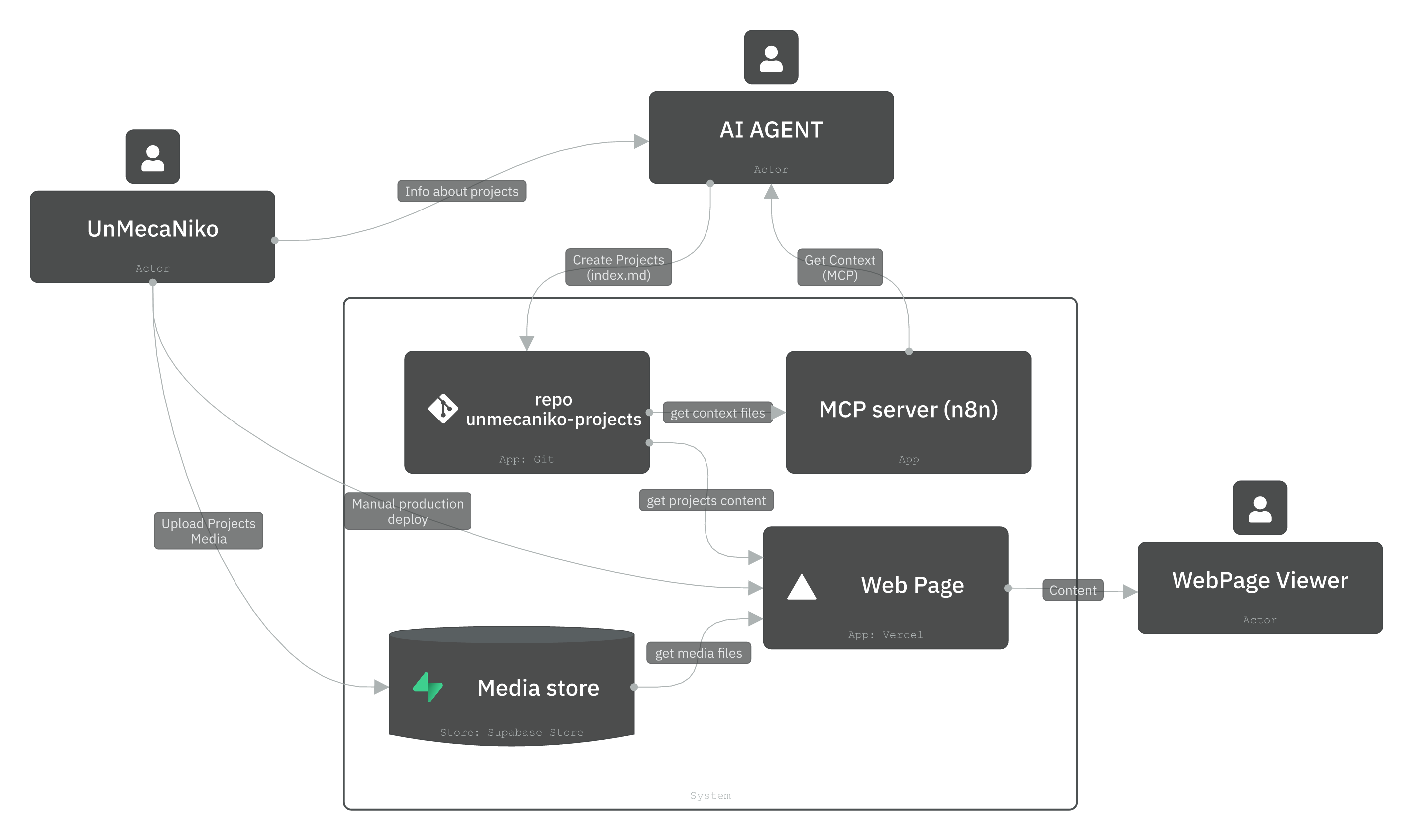
The website automatically consumes content from the index.md files, detects when there's a new folder in /projects/ and creates one more thumbnail on the main page that when clicked takes you to the page with all the project details.
Architecture / Stack
The system follows a structured approach with clear separation of concerns:
Repository Structure:
/projects-portfolio-repo
│
├── README.md # Global index of the repository
│
├── /projects # One folder per project, each with index.md
│ ├── izy/
│ │ └── index.md
│ ├── domichat/
│ │ └── index.md
│ └── ...
│
└── /context
  ├── repository-context.md
  ├── about-unmecaniko.md
  └── project-template.md
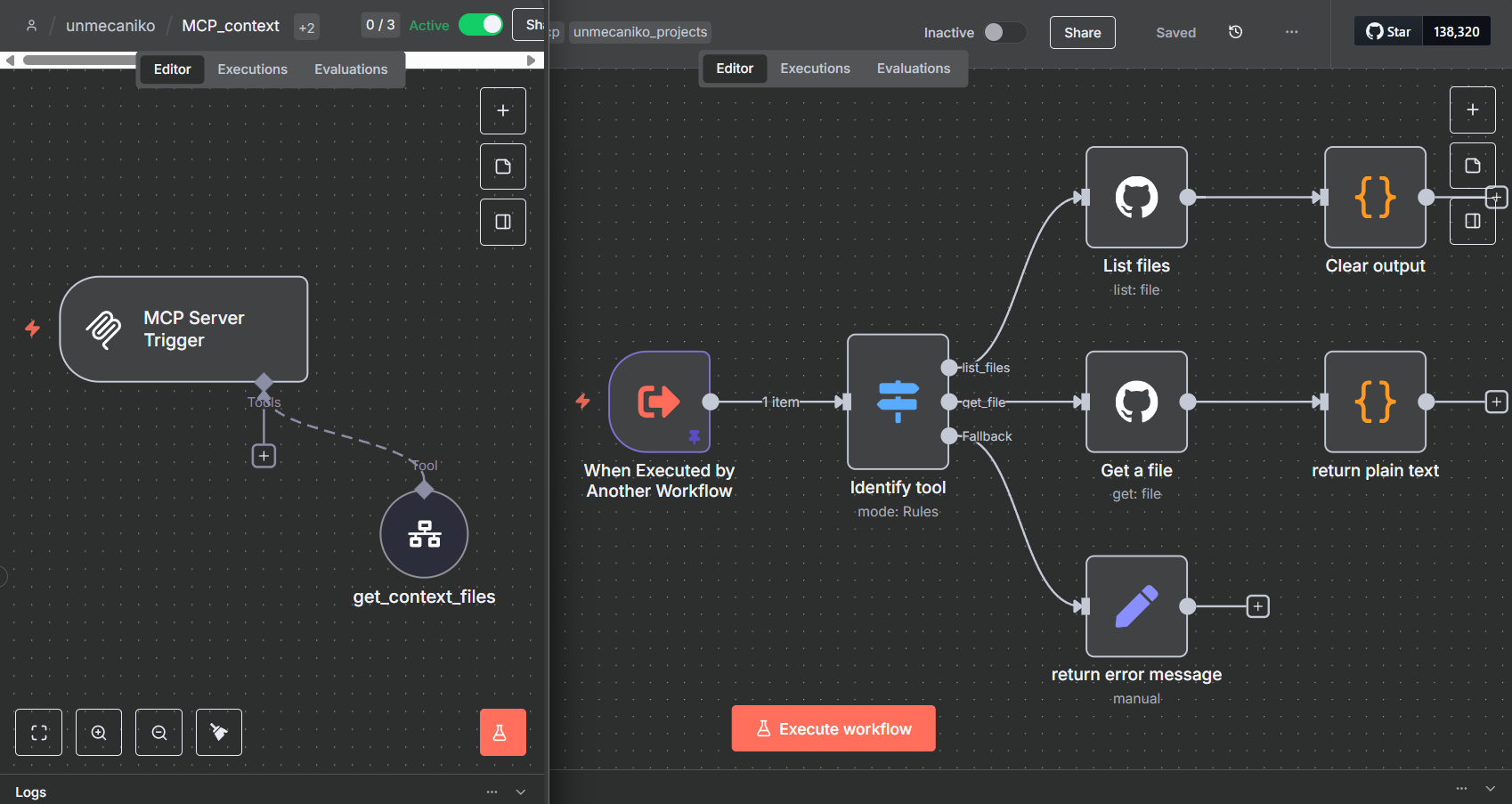
MCP Server Implementation: The MCP server is an n8n trigger that connects as a tool to a sub-workflow that queries information directly from GitHub. This enables AI agents to access repository context and create new project entries automatically.
Key Components:
- Context Files: Provide structured guidance for AI agents and humans
- Project Templates: Ensure consistency across all project documentation
- Automated Detection: Website automatically discovers new projects
- Media Management: External storage via Supabase for images and YouTube for videos
Results
The system successfully automated the project documentation process and eliminated manual content management workflows. Key achievements include:
- Automated Content Creation: AI agents can now create project entries following structured templates
- Dynamic Website Updates: New projects automatically appear on the website without manual intervention
- Consistent Documentation: All projects follow the same structured format and metadata standards
- Scalable Architecture: The system can handle an unlimited number of projects with minimal maintenance
Future Improvements:
- Create an agent that researches projects more deeply, extracting information from LinkedIn
- Add Supabase connection for automated photo uploads
- Improve index.md creation accuracy - agents sometimes forget metadata or deviate from structure
- Implement project filtering by categories on the landing page
- Add more historical projects to the portfolio
The system represents a significant improvement over manual content management, providing a foundation for scalable portfolio growth and automated documentation processes. 🚀
Gallery
Links
Stack
Tags
Last updated: 2025-09-16